
Building the HCISD AI Application: My Journey
I never expected that being selected for an innovation pod would lead to me building an AI application for our entire district. But here we are.
How It All Started: Innovation Pods
It started when our district decided to create "innovation pods", basically we brought together every stakeholder you can imagine. HCISD pulled in community members, teachers, principals, curriculum coaches, everyone. The goal? Figure out how to integrate AI into HCISD as it was exploding in popularity. I was lucky enough to be selected as one of the teachers for the AI pod, one of five groups tackling different aspects of district innovation.
Sitting in those pod meetings, I kept hearing the same theme over and over: teachers were using everything. ChatGPT, Gemini, Grok, Claude, Magic School, Brisk, Adobe, etc... you name it, someone in the district was using it. And honestly, it made sense. These tools were powerful, but it also created this fragmented landscape where everyone was working in silos, using different platforms with different security policies, different capabilities, and no way to share knowledge or ensure consistency.
As someone who loves technology, especially in education. I'd already been building AI tools for my own students in the classroom. So I was already deep in the AI world, experimenting, seeing what worked and what didn't. That's when it hit me, why don't we build our own?
The Vision: One Platform, Our Rules
The idea was simple but ambitious. Instead of having dozens of teachers, administrators, students using dozens of different AI tools, what if we had one application? Our own security, our own document connections, our own customizable solution. We could even integrate multiple AI models through APIs, giving us flexibility while maintaining control.
But I didn't want to just build something quick that people would use for a few months and abandon. I wanted to build a foundation. A platform we could grow, customize, and evolve as our needs changed. That meant making thoughtful technology choices from the start.
The Tech Stack
I went with the Google ecosystem, which made sense for a few reasons. First, our district already uses Google Workspace. Second, the integration possibilities were enormous. And third, Google's AI offerings through Vertex AI were exactly what I needed for a flexible, powerful backend.
Here's what I settled on:
Frontend: React + Vite for a fast, modern development experience. TypeScript for everything. Tailwind CSS for styling because it's fast and maintainable.
Backend: Firebase became my backbone. Firebase Authentication handles all our user management and security. Firestore stores conversations and user data in real-time. Cloud Functions handle serverless backend logic. Firebase storage handles our documents. The beauty of Firebase is that it scales automatically and integrates seamlessly with the rest of Google's ecosystem.
AI API: This is where it gets interesting. I'm using Google Vertex AI, which gives me access to multiple AI models through a unified API. Initially, I experimented with Genkit, but I ended up moving away from it in favor of working directly with Vertex AI's APIs. It was less overhead and less reading documentation for me haha!
RAG (Retrieval-Augmented Generation): Instead of using third-party vector databases like Weaviate, I switched to Vertex AI's built-in RAG engine. It's tightly integrated, well-supported, automatically scales, and honestly just works better for our use case.
The RAG Flow: Making AI District-Smart
One of the most critical pieces of this application is the RAG implementation. Here's the problem: generic AI models don't know anything about HCISD policies, procedures, or internal documents. They'll give you generic answers, which isn't helpful when an administrator needs to know about our specific guidelines.
The RAG flow solves this. Here's how it works:
-
Document Ingestion: I had to figure out how to scrape and ingest documents from multiple sources, Google Drive, Google Sites, PDFs, HCISD Website, HCISD Internal Websites, you name it. This wasn't just about downloading files; it meant parsing them, chunking them into meaningful segments, and preparing them for embedding (Which the RAG Engine handles thankfully).
-
Vector Embeddings: Each document chunk gets converted into a vector embedding, essentially an array of numbers that represent its meaning. This happens through Vertex AI's embedding models and also LLM parsers.
-
Storage: These embeddings live in Vertex AI's RAG engine, indexed and ready for retrieval. I also have a system where it uploads each document to firebase storage as well.
-
Queries: When an administrator asks a question, their query also gets embedded. The system finds the most relevant document chunks based on semantic similarity. Those relevant chunks get injected into the prompt sent to the AI model, giving it the context it needs to answer accurately based on our internal knowledge. The AI model generates a response grounded in our actual policies and documents which reduces hallucinations.
This RAG pipeline means administrators can ask questions like "What's our policy on student device usage?" and get accurate, sourced answers from our actual policy documents.
Authentication: The Unexpected Challenge
You'd think authentication would be straightforward, right? But getting everyone authenticated correctly in a school district environment? That was harder than I expected.
The challenge wasn't technical, it was organizational. We needed to ensure that:
- Users could sign in with their HCISD email, which uses microsoft.
- Only authorized district personnel could access the app
- Different roles (administrators, teachers, students) had appropriate permissions
- We could scale from 4 users to potentially thousands
- The authentication flow was smooth enough that people would actually use it
I ended up implementing a role-based access system where users are put into outlook groups. If they are in the outlook group, it registers that as the role. Then creates the user in Firestore after initial authentication. This gives me fine-grained control over who sees what, and it sets the foundation for the different dashboards I'm building.
Current State: Starting with Administrators
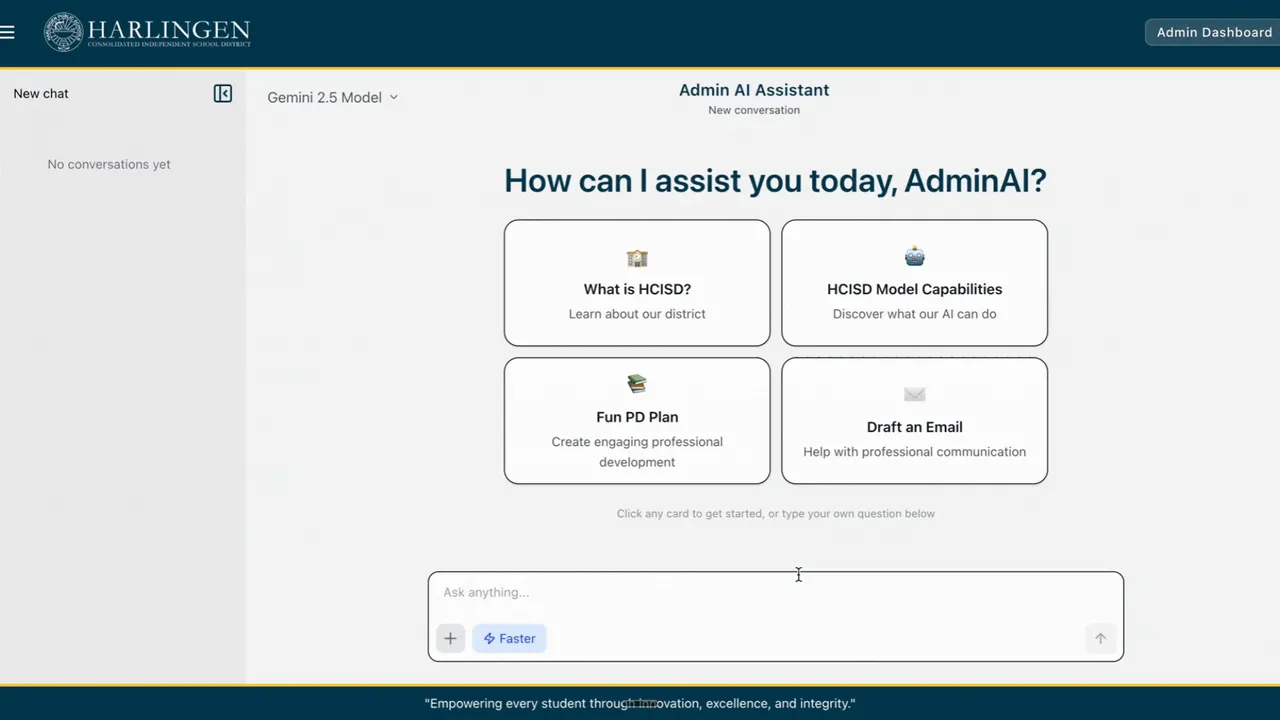
Right now, the application is internal-only with about 150+ administrators using it. This is intentional. I wanted to start small, get feedback, and iterate before rolling out to hundreds or thousands of users.
What's Working:
- Full chat interface for administrators
- RAG integration with our internal documents
- Real-time conversation storage
- Clean, responsive UI
- Role-based access control
What's Not Done Yet:
- Student dashboard
- Teacher dashboard
- TEKS integration (planned for teachers)
- Multi-agent orchestration (on the roadmap)
For students, my vision is clear: the AI should guide them to the answer, not give them the answer. This is where Google's Learn LM (the educational layer underneath Gemini models) is perfect. It's specifically designed to help students learn, not to do their homework for them.
For teachers, I'm planning to integrate TEKS (Texas Essential Knowledge and Skills) standards so they can get AI-powered lesson planning assistance that aligns with state requirements. But I want to nail the administrator experience first before expanding.
The Challenge: Everyone's Using AI (But Differently)
Here's the thing that keeps me up at night: AI is moving fast. By the time I implement a feature, there's already a new model, a new capability, a new best practice. Administrators, Teachers, and students are still using ChatGPT, Gemini, Claude, and everything else because those tools are evolving rapidly and they're already familiar with them. Convincing people to switch to our internal platform means I need to offer something better, more relevant context, better security, district-specific knowledge. The RAG implementation helps, but it's a constant battle to stay competitive with consumer AI tools that have massive teams and resources. And then there's the hallucination problem. Even with RAG, AI models sometimes make stuff up. I've had to build in verification mechanisms, source citations, and confidence indicators to help users know when to trust the AI and when to verify.
Scalability: Building for Growth
Right now, we're at around 150 users. But HCISD serves over 16,000 students across more than 30 campuses. If this application takes off, I need infrastructure that can handle that scale. That's why I chose serverless architecture with Firebase and Vertex AI. There's no servers to manage, no capacity planning to worry about. Usage scales automatically with demand. Cloud Functions spin up as needed and shut down when idle. Vertex AI handles AI requests at whatever volume we throw at it. But scalability isn't just technical. It's also about building features that work for different user groups, maintaining consistent quality as we grow, and iterating based on real feedback without breaking things for existing users.
Working with Dr. Hruska
Throughout this journey, I've been working closely with Dr. Jessica Hruska, HCISD's Director of Innovative Practices. Her vision and support have been instrumental in making this project possible. She understands both the potential and the challenges of AI in education, and she's helped navigate the organizational side while I focus on the technical implementation.
Lessons Learned (So Far)
Start Small, Iterate Fast: Launching with administrators was the right call. I'm learning what works and what doesn't before scaling.
Users Don't Care About Your Tech Stack: Administrators don't care that I'm using Vertex AI or RAG. They care that they can ask questions and get accurate answers quickly.
It Is Never As Simple As You Think: Plan for edge cases, organizational complexity, and human behavior.
AI Is A Moving Target: What's cutting-edge today might be obsolete in six months. Build foundations that can adapt.
Security Can't Be An Afterthought: Especially in education with student data involved, security and privacy need to be built in from day one.
Listen To Your Users: The features I thought were most important aren't always what users actually need.
What's Next
This application is still evolving. I'm constantly gathering feedback, fixing bugs, adding features, and learning. My goal is to expand to teachers next, then eventually to students, but only when each phase is solid.
If you're interested in building AI applications for education, my biggest advice is: start with a real problem, build for your actual users, and don't try to boil the ocean. Find one thing you can do really well, nail it, then expand.
Connect
Want to talk about AI in education or building custom AI applications?
- Work Email: andres.gonzales@hcisd.org
- Personal Email: andrisgonzalis@gmail.com
- GitHub: @andres-ai-dev
I'm always happy to share what I'm learning.